


Description
Product Import Export Plugin for WooCommerce 3.8.3 WordPress Plugin – Nulled Download Highlights
Export to or Import Products from CSV/XML
Provisions for quick export/import from DB, based on a pre-saved mapping or a new export with advanced options. Process data in batches ensuring successful import/export.

Scheduled Import or Export using multiple FTP/URL
Multiple FTP Profiles or Scheduling options included. Dedicated FTP profile settings to manage and manipulate scheduled import/export.

Supports multiple product types
The plugin facilitates the import/export of multiple product types including simple products, variable products, group products, external products, custom, etc.

Compatible with major 3rd-party plugins
Compatible with WooCommerce Product Bundles, Yoast WooCommerce SEO, Woocommerce Cost of Goods, Advanced Custom Fields, WPML, Polylang, etc.

Simple Ajax interface and flexible API
User-friendly interface for better import/export experience. Easy drag and drop mapping columns provisions embedded within different categories.

Several filter options for custom import/export
Filter products in different ways to obtain custom import/export with provisions to include images, variations, and metadata.

Detailed History, Debug logs, Cron Schedules
History, debug logs, and Cron schedules for recording success/failure of processes, troubleshooting, and for viewing all scheduled and completed actions.

Effortless to&fro Migration
Export/import products including images, categories, custom metadata, etc. from one website to the other with the help of a CSV or XML file.

Provision for Bulk Edit
Make changes merge or update additional product information to existing products before or during the import/export.
Downloading Product Import Export Plugin for WooCommerce 3.8.3 WordPress Plugin – Nulled Download for free
Upon acquiring this plugin file, navigate to your dashboard and locate your files on the downloads page. Proceed to download them as a zip file. Additionally, you’ll find the item’s original purchase code available, should you require it.
How to install Product Import Export Plugin for WooCommerce 3.8.3 WordPress Plugin – Nulled Download
To address any installation issues with this WordPress plugin, refer to the installation guide provided below. Should you encounter any difficulties during the process, do not hesitate to reach out to us for assistance.
Obtain the plugin archive.
Access your blog’s dashboard and navigate to Plugins > Add New. Then, enter your search term into the search box located at the top right corner.
Upload the plugin
From there, click on the “Upload Plugin” button visible at the top:
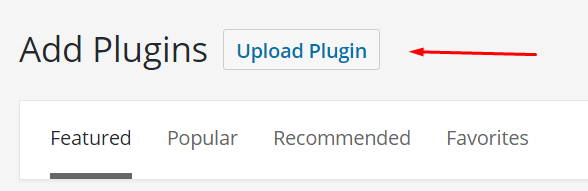
On the next screen, you will be able to upload your plugin’s ZIP file straight to your WordPress. Select the Product Import Export Plugin for WooCommerce 3.8.3 WordPress Plugin – Nulled Download ZIP from your desktop and confirm the upload by clicking on “Install Now.”
Activate the plugin
When WordPress finishes doing its magic, you’ll only need to activate the plugin:
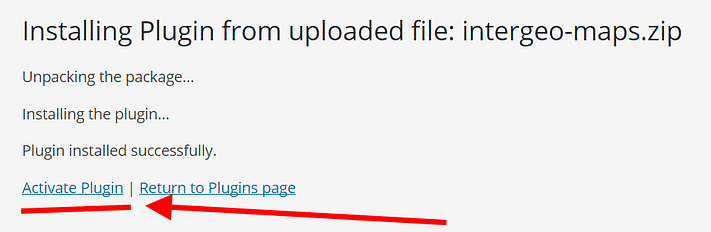
After doing so, the plugin is online and you can start using it.


There are no reviews yet.